
Want to start a food blog but don’t know where to start? I know how frustrating it can be to deal with technical stuff when you really just want to share that killer recipe. Whether you want to start a cooking blog, or you want to become a more successful food blogger, I hope these tips will ease your technical troubles.
Ready to start a beautiful food blog? You have two options:
- Hire a web designer to do it for you. Custom designs usually cost thousands of dollars, but they are certainly an option if you have the money to spend. Be sure to ask for references and wait times before you write a check.
- Do it yourself. I’ll explain how to build your own self-hosted WordPress website below. It will cost you as little as $2.95 per month in hosting, plus the cost of a theme (free to $130). I built this site myself using the tools provided below, so I know you can do it!
Start your own food blog: the basic steps
Here are the basic steps to set up a self-hosted WordPress food blog that is both beautiful and functional. Your blog will have your own domain name and your own distinct look, and it will be able to scale with you as your blog grows. When you’re starting a food blog, I recommend following these steps for a greater shot at success.
1) Name your blog and buy a matching domain name.
Domain names are short, memorable and typically end in .com (yourblogname.com).
Cost: free with Bluehost or around $15 per year elsewhere.
2) Find a reliable web host.
A web host stores your website and makes it accessible to the world wide web. In other words, your website “lives” on your web host’s servers.
Cost: $2.95 per month and up.
3) Install WordPress.
WordPress is top-of-the-line, industry standard blogging software.
Cost: free!
4) Install a WordPress theme.
Your WordPress theme will determine the look, feel and functionality of your website.
Cost: free to $130.
5) Set up Google tools.
Google offers invaluable tools and services like Google Analytics and Search Console.
Cost: free!
6) Install WordPress plugins.
WordPress plugins extend the functionality of WordPress in certain areas. For example, one of my recommended free WordPress plugins helps prevent spam comments.
Cost: free, mostly!
7) Start blogging!
Publish those recipes, stories and photos.
Cost: hard work!
Step 1: Name your blog and buy a matching domain name.
Coming up with a name for your new blog might be the hardest step. You can start brainstorming by coming up with a short mission statement or by listing words that describe your cooking style, your lifestyle, your background, etc. Throw in your name and/or your dog’s name. ;) Talk it out with friends. There are tons of great names out there that aren’t yet taken, I promise!
Characteristics of an ideal blog name
- Descriptive
- Memorable
- Short
- Easy to spell
Once you have some potential names in mind for your blog, you’ll need to check their availability. Since .com is the standard domain suffix, keep trying potential names until you find one that is available in .com. Don’t resort to hyphens or other punctuation marks to make it work (they’re too hard to remember).
You can buy your domain name from a number of providers, but it’s easiest to buy it through your web host. Hop over to Bluehost to enter your desired domain name. Hit “search” and it’ll tell you if your domain name is available. If so, snatch it up quick!
Once you have picked your perfect domain name, you can get it for free with your BlueHost hosting plan. You can also just buy the domain name and figure out the rest later (you can always transfer your domain name to another host if desired). Buy your domain name now, before someone else does!
Step 2: Find a reliable web host.
You’ll want to start with an affordable shared hosting plan that offers automatic WordPress installation. I know this hosting stuff sounds complicated, but pick one and power through! Your food blog awaits.
The best web host for new food blogs:

BlueHost: I recommend Bluehost for beginners and growing blogs because it’s affordable, reliable, easy to set up, fast, and offers 24/7 customer support. Bluehost’s “starter” plan is about as cheap as hosting gets. Click here to get started with BlueHost for as low as $2.95 per month and get a free domain name.
With Bluehost, like all the other inexpensive hosts, you’ll pay for your plan upfront. Don’t worry, though—if for some reason you aren’t happy with Bluehost, you can cancel within 30 days for a full refund. (Domain fee excluded, which you’d pay for elsewhere anyway.)
Good to know: Bluehost loves Cookie and Kate readers. Purchase your hosting through any of my links to Bluehost and you’ll get the best deal available. No promo code required.
Here’s how to get the most from your Bluehost plan:
First, choose your plan. I recommend the basic plan, which is the least expensive and offers everything you need to get started.
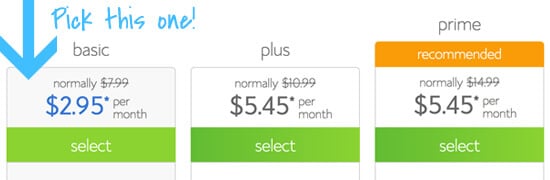
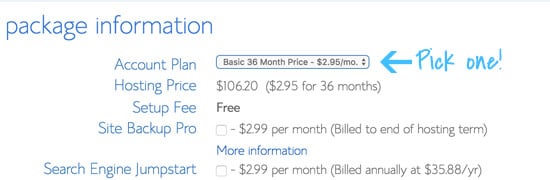
Then, choose your term. In order to get your free domain name for a year (a $15 savings) and a significant discount on your monthly rate, you’ll need to pay for at least one year of hosting upfront. Feel free to choose a longer term if you’re serious about blogging and want to save more money, but one year is a great start.
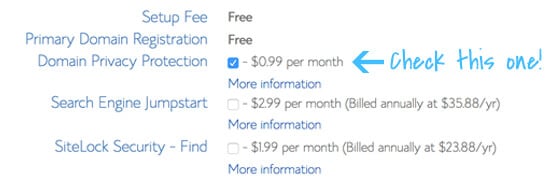
Lastly, choose your add-ons. The only add-on I would choose is “Domain Privacy Protection,” which will make sure your personal address and phone number are kept private. Otherwise, your personal information will be available to marketers and the general public. Please be safe!
Step 3: Install WordPress.
This part is so easy. If you purchased a Bluehost shared hosting plan as suggested, WordPress will be installed on your site automatically!
Once you’re logged into your WordPress site, go to Settings > Permalink Settings page and change your permalink structure to “Post name.” Hit save. Now it’s time to make your blog look pretty.
Step 4: Install a WordPress theme.
Now we’re getting to the fun part! Your WordPress theme will determine the look and feel of your site, so pick a good one.
What to look for in a WordPress theme
- Well designed: Your theme should suit your aesthetic and offer the features you want. The theme should also be coded by someone who knows what they’re doing.
- Responsive. Responsive designs are built to provide an optimal viewing experience for your visitors, whether they’re visiting from their computer, phone or tablet. That means your visitors won’t have to pinch and zoom to read your posts—your text will already be a legible size.
- Optimized for search results: This goes along with the last couple of points, because a well-designed site will naturally rank higher in search results than a site built on a theme that is full of errors. (Want to know if you potential theme has coding errors? Run its URL through the W3C’s markup validation service. You don’t have to understand what all the errors mean, but know that fewer errors are better than more errors.)
- User friendly: Find a theme that offers built-in design options so you don’t have to edit code to change basic stuff. These features will save you a ton of time. Your theme should make it easy for you to change your logo, color scheme, etc.
- Backed by great support: When you experience technical issues, a responsive support team and/or community forums are invaluable resources.
My bottom line: You can start with a free theme, but I recommend that you pony up some cash for a premium WordPress theme from a reputable provider. The time and headaches that you save down the road will make it money well spent.
Recommended premium WordPress themes
I originally built this blog on a basic, free WordPress theme and customized it myself. In February 2014, I launched a redesigned website through the Studiopress platform, and my site has grown significantly since then. In 2024, I launched a fully custom design made by CultivateWP (check out their semi-custom options).
How to install a WordPress theme
Another easy step! Look in the sidebar and hover over “appearance.” Click on the “themes” option. From here, you can either upload a theme or browse available free themes. Hover over any theme to find links to preview or install it. Click here for more in-depth instructions with visuals.
Tips for designing a user-friendly food blog
When you’re tweaking the settings on your WordPress theme, keep the following in mind.
- Clear navigation: Keep your blog design clean and uncluttered, so visitors can find what they’re looking for.
- Encourage following: Place prominent links to your RSS feed, email subscription option and social media on every page.
- Commenting: Don’t require CAPTCHAs or ask visitors to login first.
- Suggest sharing: Provide social media sharing buttons at the end of each post.
Step 5: Set up Google tools.
First, set up a new Google account and email (Gmail) address for your blog. It’s nice to keep your blog-related emails and accounts separate, and you will need a Google account to use the following tools. Create a new Gmail account here.
Once you have a Google account, log in and set up the following:
- Google Analytics: Helps you track blog traffic. (Note: install the tracking code in your Yoast SEO plugin settings.)
- Google Search Console: Makes sure your website is up and running. (Note: install the tracking code in your Yoast SEO plugin settings.)
Step 6: Install WordPress plugins.
Each of these plugins provide valuable features that might not automatically come with your theme.
Recommended WordPress plugins for food blogs:
- Akismet: Filters out spam comments without requiring CAPTCHA. Nobody likes CAPTCHAs.
- Tasty Recipes: Formats your recipes for search engine optimization (SEO), adds star ratings, creates print-friendly recipes, and more. This plugin will help your recipe’s photo show up in the search results, and we’re all more likely to click on those links, right? This is a paid plugin but I believe the functionality is absolutely worth the cost.
- Share Buttons of some sort: There are many social bookmarking plugins that will add a Facebook like button, Pin-It button, etc. to each post. Pick your favorite!
- Subscribe To Comments Reloaded: With this plugin, your commenters will receive your replies to their comments by email. This is a helpful feature for readers and improves engagement.
- Yoast SEO: SEO is a complicated beast and this plug-in will help you make sure you have covered your bases. You will need to take the time to go through all the steps and set it up properly, though. Be sure to use it to set up Google Analytics and Google Search Console. It will be worth the effort!
How to install a WordPress plugin
Easy! Go to your WordPress dashboard and look in the sidebar for “Plugins.” Hover over “Plugins” and click on the “Add New” option.
Then look for the “Search Plugins” field and search for one of the plugins by name. When you find it, click “Install Now.” Then, configure the plugin settings as directed.
Step 7: Start blogging.
Congratulations!!! Now you’re ready to start publishing posts on your new food blog.
I have a food blog! Now what?
Here are my Top 20 Tips for Food Blogging, and you’ll find more helpful links below.
How do I write great content?
- Ira Glass on Storytelling
- Blog Q&A: Should I launch with content?
- What Should Food Bloggers Write About?
- The Kitchn’s Recipe Writing Tips
How do I take appetizing food photos and make videos?
Practice, practice and more practice!
How do I get traffic to my blog?
Search engine optimization (SEO): Following SEO best practices will help your posts rank well in search results.
- Google’s SEO Starter Guide
- WPBeginners’ Ultimate WordPress SEO Guide for Beginners
- Google’s Search Quality Rating Guidelines PDF (181 pages, yikes!)
How do food bloggers make money?
Options include ad networks, affiliate links, sponsored posts, ebooks, etc.
- How to Build a Blog Business Plan by Melyssa Griffin
- The Comparison Trap: How to Enjoy the Success of Others
- Disclosure Guidelines for Bloggers from the FTC
Questions? Please leave them in the comments section below, and I’ll do my best to answer them.


